Opening Range Box
High, low, mid line, and a day-type label — Normal / Wide–Trend Day / Compression — drawn the moment the opening range forms.
NinjaTrader 8 Indicator · Four-Check Opening-Range Scoring · Auto-Detects NQ / MNQ / ES / MES
A signal indicator built specifically for the New York opening range on NQ and ES futures. It scores four checks on every bar — the opening-range breakout, VWAP position, momentum velocity and the bar's delta spike, with an ORB retest able to stand in for the breakout — into a single score out of 4, with projections (P1–P3) and an invalidation level drawn the moment a signal fires.
One-time Founders license License key and download at whop.com/steelysystems within minutes 7-day refund if not activated License terms One-page guide (PDF)
 Click to enlarge
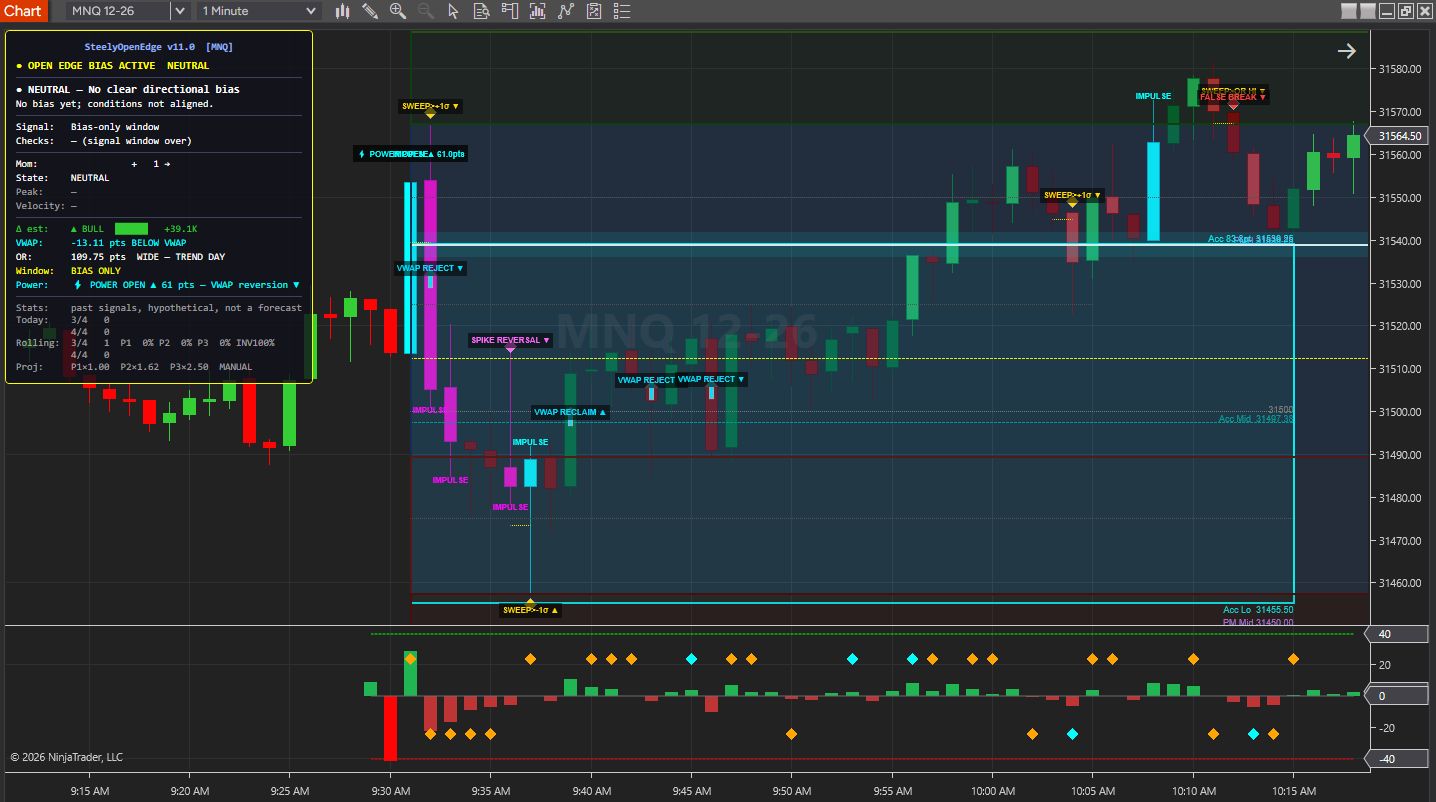
What SteelyOpenEdge draws and reports in NinjaTrader 8.
High, low, mid line, and a day-type label — Normal / Wide–Trend Day / Compression — drawn the moment the opening range forms.
The 8:12–9:12 ET configured pre-open window shown as a cyan zone. Once it has formed, projections are measured from this range (Use Acc Range for Projections, on by default).
Session-anchored VWAP with inner and outer standard-deviation bands. Extension at the outer band is auto-detected and used to hold back new with-trend signals.
Bull ▲ / Bear ▼ arrows with a score label, color-coded by strength, max-score signals marked with a diamond. P1/P2/P3 projections and the invalidation level drawn instantly, with progress fill animating as price moves.
Bars shade from dull neutral to neon based on each bar's estimated delta against the session average — delta activity becomes visible before the signal fires.
Oversized opening bars flagged with ⚡ Power Open detection, with a HUD row showing the direction a reversion toward VWAP would take.
When an active signal's momentum drops below the Decay Trigger share of its peak (50% by default), the chart and HUD flag it (⚡ MOMENTUM FADING) as context.
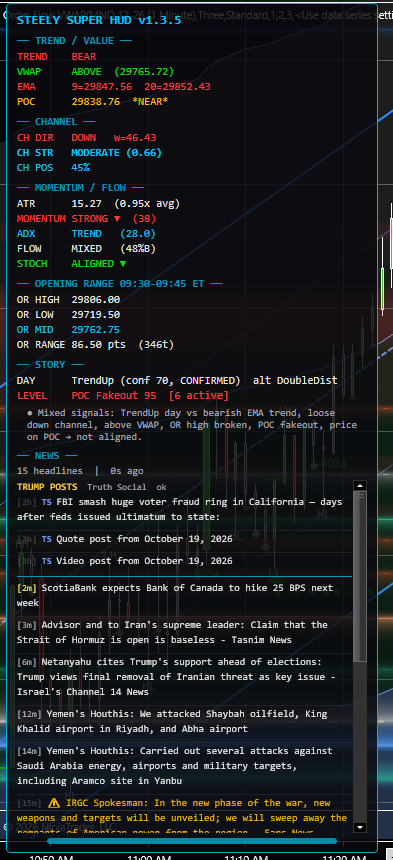
Always-visible dashboard showing bias state, OR classification, VWAP distance, the active signal's projections and progress, and past-signal stats (hypothetical, not a forecast).
NinjaTrader 8 chart example. Other overlays may be visible alongside the featured indicator.
Click to enlargeOpening-range, VWAP, momentum, delta, and retest context with signal and projection references.
Keep in mind: Review the confirmation and session settings. A drawn projection or invalidation level is a reference, not an execution instruction or an assured outcome.
The period following the 9:30 AM New York open is the focus of this tool. The opening range, session VWAP, and momentum readings provide a framework for observing the start of the session.
SteelyOpenEdge scores that breakout bar by bar on four checks, then fires a bullish or bearish arrow with projections and an invalidation level already drawn — so the read and the levels arrive together, not piecemeal.
The intended workflow uses a 1-minute chart around the New York open, with a configurable session window. Drop it on any NQ, MNQ, ES, or MES chart and it reads the symbol and configures itself automatically.
Important Notice: This indicator is a non-customized charting tool provided for educational and informational market analysis only. It highlights conditions that meet proprietary analytical criteria and does not constitute financial advice, trading recommendations, or a solicitation to buy or sell any instrument. All signal output is analytical in nature. Users remain solely responsible for whether, when, and how they trade. Past performance of any analytical method is not indicative of future results. Educational and informational only; not a recommendation to buy or sell.
Every bar, the engine scores four checks for a score out of 4; an ORB retest can stand in for the breakout point. The HUD refreshes once per bar, so the score is visible before any arrow appears.
| Factor | What It Checks |
|---|---|
| OR Position | Price beyond the 15-min opening-range high or low (the OR mid before 9:45). |
| VWAP Position | Price on the signal's side of session VWAP. |
| Momentum | Velocity oscillator confirming direction rather than opposing it. |
| Delta Spike | The bar's estimated delta beyond 2.5× (NQ/MNQ) or 2× the session average. |
| ORB Retest | Price back at the broken 15-min ORB level; stands in for a lost breakout point. |
A signal appears when the configured confirmation requirements are met, with P1, P2 and P3 projections and an invalidation level drawn alongside it. The listed inputs describe the engine; confirmation settings control which signals are displayed.
Built for the New York opening range on NQ, MNQ, ES, and MES — a 1-minute chart and configurable session window, with the projections and invalidation level drawn the moment a signal qualifies.
The HUD score refreshes once per bar as the opening range resolves, so the build-up of a setup is visible bar by bar before the arrow ever prints.
A six-state bias engine classifies the session, and its Bias Filter holds back new with-trend signals when price is already extended or within 1 ATR of the prior-day high or low. Counter-trend signals are never blocked.
The indicator reads the chart symbol and loads the right thresholds, round-number scale, and OR classification for NQ/MNQ or ES/MES — no preset toggle, no manual setup.
NinjaTrader 8, version 8.1.x, on Windows. A live or sim market data connection in NinjaTrader 8. No other SteelySystems indicator is required — every tool runs standalone.
Yes — $179 one-time as a Core-tier indicator. It is also included in the Complete Suite ($1,800, all 12 paid indicators plus the free SteelyNewsPanel and SteelyStructure — $2,362 bought one at a time).
Checkout runs through Whop. Your license key and the download appear at whop.com/steelysystems (sign in with your checkout email), normally within minutes; the Install guide there walks through setup. Import the file in NinjaTrader 8 via Tools → Import NinjaScript Add-On, enter the key, and add the indicator to a chart. Email install support is included.
The license is per user. Install it on any desktop, laptop or VPS that you personally use for your own trading. Sharing the key or the files is not permitted — see the License Agreement.
A one-time Founders license with compatibility patches and install support, available through December 31, 2026. From January 1, 2027 new purchases move to a subscription model. Founders keep their one-time licenses and are not required to subscribe.
Yes, within 7 days of purchase if the license key has not been activated. Once a key is activated the sale is final — details on the Refund Policy page.
No. Every signal, level, score or panel is an analytical aid, not a trade instruction. The indicator organizes context; the decision, the risk and the outcome are yours. Read the full disclosure before use.
Yes. The Steely Custom Sounds pack is free with every indicator purchase.
Yes, heavily, and on purpose. We use leading AI models and our own custom AI tooling in modeling, analysis and development, including the research behind the DI Briefs and Helix. AI doesn't generate trade signals and doesn't place trades. The indicators run rules we designed and can show on your chart. Everything is tested in simulation and in our own trading before it ships.
Each tool runs standalone.
SteelyOpenEdge combines four checks into a single score on the New York open, draws the projections and invalidation level the moment a signal qualifies, and keeps reading the move after the signal fires. Built for one window, and built to live there.
One-time Founders license License key and download at whop.com/steelysystems within minutes 7-day refund if not activated License terms One-page guide (PDF)