Swing Labels
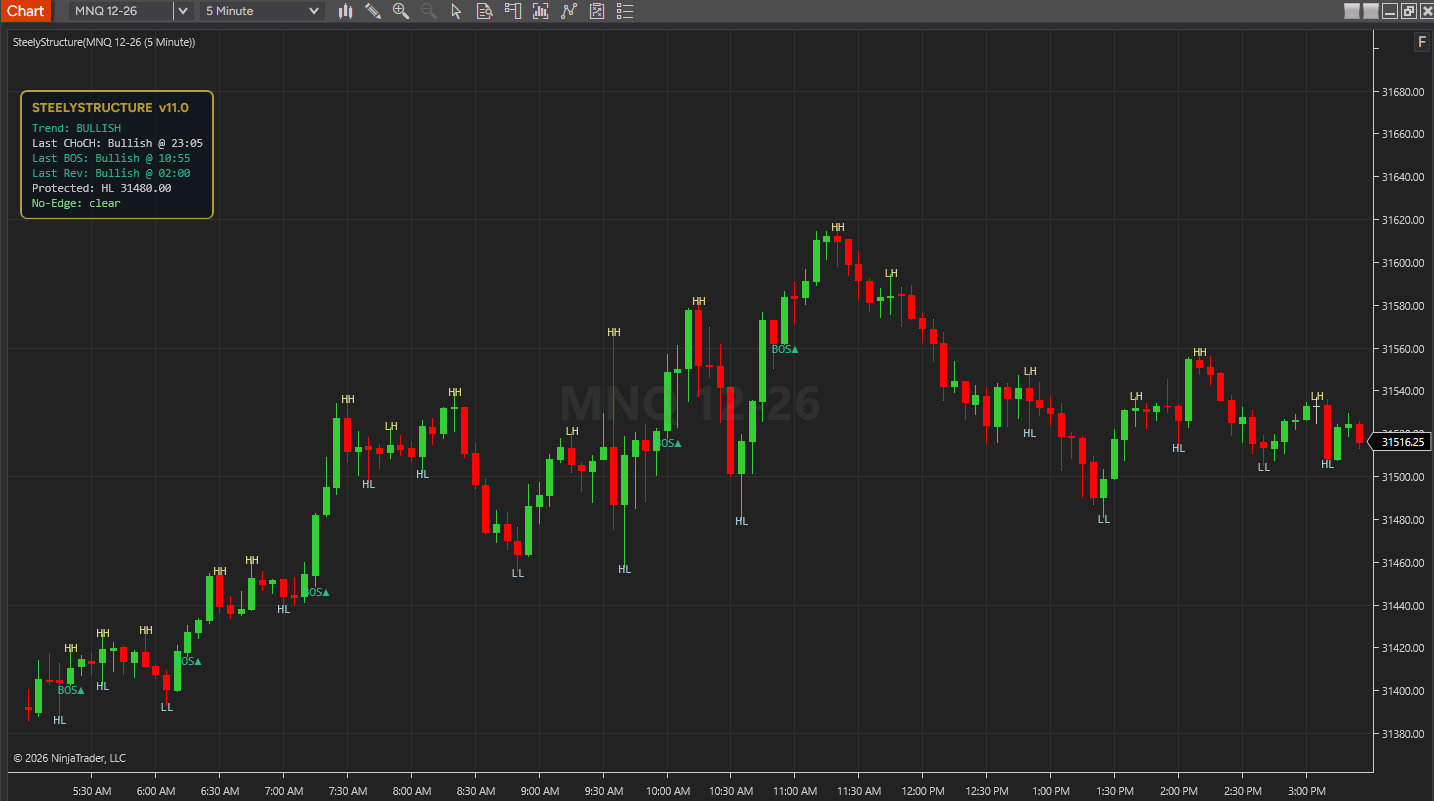
Each confirmed two-bar swing is labeled HH, HL, LH or LL against the previous swing of the same type (the first one is H or L) — highs in khaki, lows in light blue.
NinjaTrader 8 Indicator · Free License · Close-Confirmed Swings, CHoCH & BOS · Built on the SteelyKerze Structure Engine
SteelyStructure is a free NinjaTrader 8 indicator that marks market structure on the chart: each confirmed swing labeled HH, HL, LH or LL, change-of-character (CHoCH) and break-of-structure (BOS) on the bar whose close confirms them, and a shaded no-edge zone while a reversal is still unresolved. A compact HUD shows the current trend, the protected level and the latest structure events. It runs the structure engine from SteelyKerze, without Kerze's candle setups and their trigger, invalidation and projection lines.
Free license License key and download at whop.com/steelysystems within minutes License terms One-page guide (PDF)
 Click to enlarge
Every mark traces back to a close-based rule. Wick-only moves do not meet the close condition; confirmation rules determine when a label appears.
Each confirmed two-bar swing is labeled HH, HL, LH or LL against the previous swing of the same type (the first one is H or L) — highs in khaki, lows in light blue.
When a close breaks the protected level, a line marks that level from its swing to the CHoCH bar, with a CHoCH▲ or CHoCH▼ label.
BOS▲ or BOS▼ on the bar whose close breaks the last HH or LL.
①LH / ①HL for step 2 of a reversal, ②REV▲ / ②REV▼ when it confirms, and REV✘ when it fails and the old trend resumes.
A low-opacity box over the unresolved range — from the CHoCH bar to the current bar while a reversal is pending, or between the latest swing high and low before the first trend is set.
A draggable panel with Trend, Last CHoCH, Last BOS and Last Rev (direction and time), the Protected level and the No-Edge status. Six anchor presets, a remembered drag position and adjustable opacity.
In real time, the chart flashes green on a bullish CHoCH and red on a bearish one. Never on historical bars, and it can be turned off.
Clicks and right-clicks pass through everything the indicator draws, so right-click always opens the chart menu. A setting restores NinjaTrader's standard click-to-select.
Marks are drawn with Direct2D by default, keeping the most recent 500 labels and markers and 200 CHoCH lines. With GPU Render off, they are standard NinjaTrader drawing objects instead.
NinjaTrader 8 chart example: swing labels, BOS markers and the HUD.
Click to enlargeEach label is placed only after its rule is met, on the bar the rule applies to.
Keep in mind: A swing label sits on the swing bar itself, but it appears only once the swing confirms two bars later. With the default bar-close calculation, CHoCH, BOS and reversal markers appear when the bar that confirms them closes. A historical label should not be mistaken for something that was visible before its confirmation.
Market structure is the sequence of swing highs and lows that shows which way a market is leaning. The hard part is deciding, the same way every time, what actually counts as a break.
SteelyStructure answers that with one rule: the bar's close. A wick through a prior swing is not a break. Only when a bar closes beyond the protected level does the structure state change — first into a transition, then, if the move follows through, into a confirmed reversal. If price closes back beyond the old extreme instead, the reversal is cancelled.
The trend state, the protected level and the latest CHoCH, BOS and reversal are drawn on the chart and mirrored in a draggable HUD. It is the structure layer of SteelyKerze, offered free on its own.
Important Notice: SteelyStructure is educational and informational decision-support software only. Its structure states, labels and HUD readings are analytical aids that describe price behavior under a fixed rule set; they are not financial advice, trading recommendations, or a solicitation to buy or sell any instrument. Whether, when, and how to act on any structure read is solely the user's decision. Past behavior of any analytical method is not indicative of future results.
SteelyStructure puts the language of market structure directly on the bars, so the trend, its pullbacks and its turning points read the same way every time you look.
| Label | What it marks on the chart |
|---|---|
| H / L — First Swing | The first confirmed swing high or low, before there is an earlier swing of the same type to compare it with. |
| HH — Higher High | A confirmed swing high above the previous swing high. |
| HL — Higher Low | A confirmed swing low above the previous swing low. In an uptrend, the pullback low the trend is defending is the protected level. |
| LH — Lower High | A confirmed swing high at or below the previous swing high. In a downtrend, the pullback high the trend is defending is the protected level. |
| LL — Lower Low | A confirmed swing low at or below the previous swing low. |
| CHoCH — Change of Character | A bar closes past the protected level — the first sign the trend may be turning. A line marks the broken level, with a CHoCH▲ or CHoCH▼ label on the bar. |
| BOS — Break of Structure | A bar closes beyond the last HH (uptrend) or LL (downtrend) — the trend continuing. The pullback swing in between becomes the new protected level. |
A swing must be a strict extreme against the two bars on each side, so it confirms two bars after it prints. Every break is judged on the close — a wick through a level doesn't count.
SteelyStructure tracks one structural state at a time and moves between states only when a close confirms the move. A pending reversal is shown as a no-edge zone until it is confirmed or cancelled.
| State | Meaning |
|---|---|
| Horizontal | No trend yet. The first close beyond the latest confirmed swing high or low sets the trend and marks a BOS. Until then, while price closes between those two swings, that range is shaded as a no-edge zone. |
| Bullish | Higher-low structure. The pullback low (HL) is the protected level; a close above the last HH is a BOS. |
| Bearish | Lower-high structure. The pullback high (LH) is the protected level; a close below the last LL is a BOS. |
| Reversing (CHoCH) | Step 1. A close past the protected level fires a CHoCH. The HUD shows REVERSING and the window from the CHoCH bar is shaded as a no-edge zone. |
| Step 2 — ①LH / ①HL | After the CHoCH leg's low (high), a swing forms against the new direction without reaching the old trend's extreme. It is marked ①LH or ①HL. |
| Confirmed Reversal — ②REV | Step 3. A close beyond the CHoCH leg's extreme flips the trend, marked ②REV▲ or ②REV▼. The step-2 swing becomes the new protected level. |
| Failed Reversal — REV✘ | A close back beyond the old trend's last high (low) cancels the reversal. The old trend resumes, marked REV✘. |
Require Full Reversal is on by default. Turn it off and the trend flips on the CHoCH alone, with no reversal steps and no no-edge zone after a CHoCH. Either way, every move is fixed to the close.
SteelyStructure is the structure engine from SteelyKerze with Kerze's candle-setup layer removed. If the structure map is what you want, Structure covers it. SteelyKerze draws its candle setups on top of the same kind of map.
SteelyKerze is sold on its own ($159) and is part of the Complete Suite. See SteelyKerze →
Built for the trader who wants one consistent definition of structure to anchor everything else on the chart.
HH, HL, LH and LL on confirmed swings, with CHoCH and BOS at the turns — one consistent structure read on any chart you load it on.
A CHoCH moves the chart into a shaded no-edge zone and the HUD reads REVERSING, so a pending reversal is visible as pending — not yet confirmed.
The trend state and protected level give a visual context layer underneath setups, levels and momentum tools elsewhere in the workspace.
Important Notice: SteelyStructure is an educational and informational charting tool. Its structure states, labels and HUD readings are analytical in nature — they describe price behavior under a fixed, mechanical rule set and do not constitute financial advice, trading recommendations, or a solicitation to buy or sell any instrument. All trading decisions are made solely by the user. Past performance of any analytical method is not indicative of future results. Educational and informational only; not a recommendation to buy or sell.
NinjaTrader 8, version 8.1.x, on Windows. A live or sim market data connection in NinjaTrader 8. No other SteelySystems indicator is required — it runs standalone.
Yes. It comes with a free license and key, delivered through Whop — there is nothing to buy. It is also included in the Complete Suite ($1,800, all 12 paid indicators plus the free SteelyNewsPanel and SteelyStructure — $2,362 bought one at a time).
Claim the free license through Whop: get it free. Your license key and the download then appear at whop.com/steelysystems, normally within minutes.
You claim the free license through Whop; your license key and the download appear at whop.com/steelysystems, normally within minutes. Import the file in NinjaTrader 8 via Tools → Import NinjaScript Add-On, enter the key, and add the indicator to a chart. Email install support is included.
A swing label sits on the swing bar but appears only after the swing confirms, two bars later. With the default bar-close calculation, CHoCH, BOS and reversal markers appear when the bar that confirms them closes. Labels and markers are not moved once drawn. With GPU Render on, the most recent 500 labels and markers are kept, so the oldest ones disappear when you scroll far back.
SteelyStructure is the structure engine from SteelyKerze on its own. Kerze adds its Kerze candle setups — a near-wickless rejection candle read in line with the confirmed trend — with trigger, invalidation and projection reference lines, a news blocker and a signal-bar highlight. Kerze is sold on its own ($159) and is in the Complete Suite. See SteelyKerze.
No. SteelyStructure is free, so there is no payment to refund. Use of the indicator is covered by the License Agreement.
No. Every label, marker, zone and HUD reading is an analytical aid, not a trade instruction. The indicator organizes context; the decision, the risk and the outcome are yours. Read the full disclosure before use.
Yes, heavily, and on purpose. We use leading AI models and our own custom AI tooling in modeling, analysis and development, including the research behind the DI Briefs and Helix. AI doesn't generate trade signals and doesn't place trades. The indicators run rules we designed and can show on your chart. Everything is tested in simulation and in our own trading before it ships.
Each tool runs standalone.
SteelyStructure reads market structure through one rule — the bar's close — and walks each leg through a visible state machine of break-of-structure, change-of-character and confirmed reversal. One consistent definition of a break, on the chart and in the HUD, at no cost.
Free license License key and download at whop.com/steelysystems within minutes License terms One-page guide (PDF)