Range Box
High, low, and mid lines drawn the moment the opening range locks, with configurable colors.
NinjaTrader 8 Indicator · State-Machine Breakout Engine · PRIME-then-RE-ARM · NinjaTrader 8
Captures the opening range, then watches for a breakout and labels it at the bar close by default. Instead of firing on every poke through the range, it runs a state machine that walks the session through clearly labeled phases — the first breakout each way each day is PRIME, later ones RE-ARM. When a break confirms, the projection levels and a live Strength Meter are already on the chart.
One-time Founders license License key and download at whop.com/steelysystems within minutes 7-day refund if not activated License terms One-page guide (PDF)
 Click to enlarge
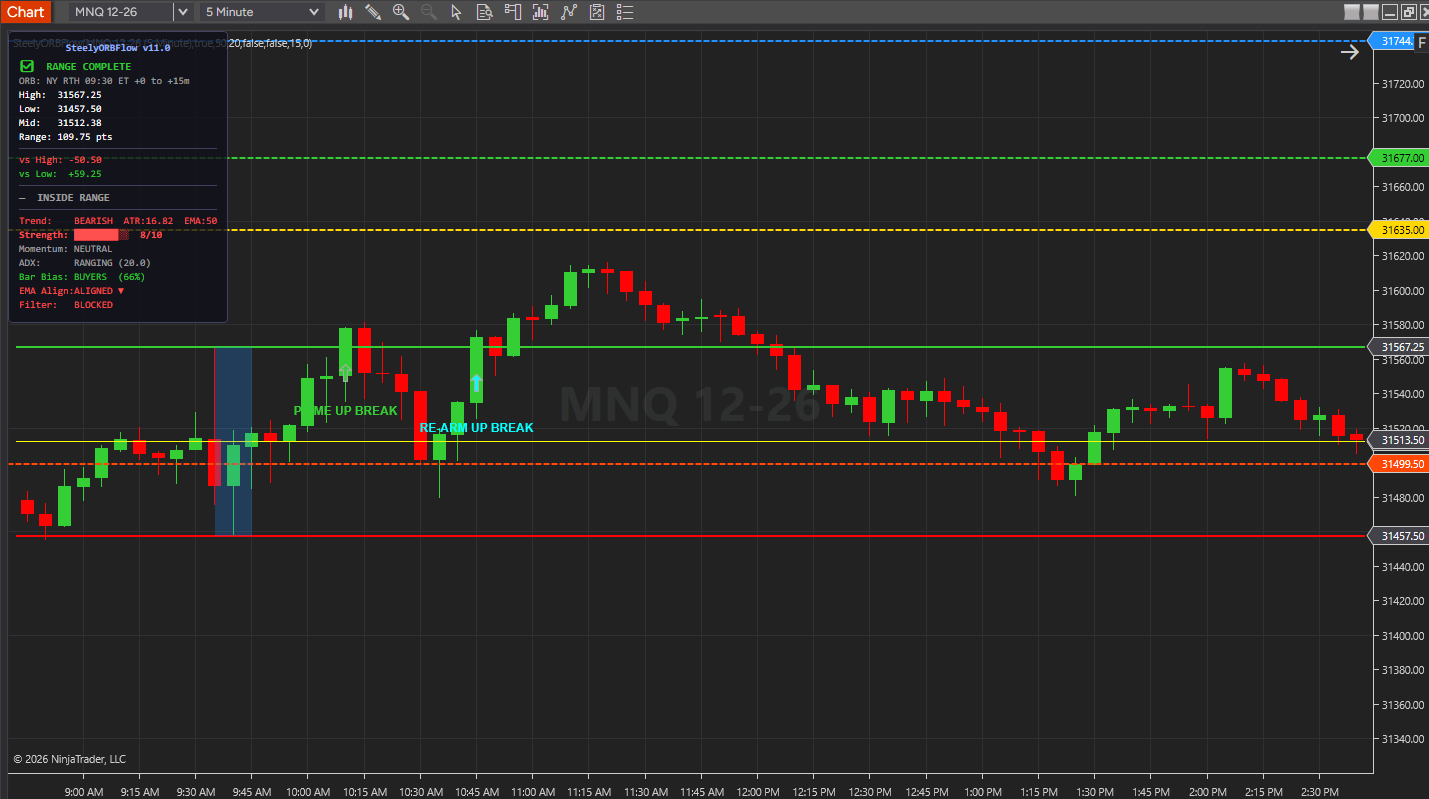
What SteelyORBFlow draws and reports in NinjaTrader 8.
High, low, and mid lines drawn the moment the opening range locks, with configurable colors.
The instant a break fires, a pullback line and three projections (P1/P2/P3) are drawn from the range, color-coded by level — and optionally clear and redraw when direction flips, so stale levels never linger.
A live 0–10 trend-quality score (context only, never a gate) from trend state, ATR, ADX, RSI, and EMA alignment, plus range high/low/mid, distance to each edge, the RE-ARM filter state, momentum, ADX, and a Bar Bias line read from candle and volume behavior.
An optional EMA gate (auto-detected or manual period) restricts RE-ARM signals to the prevailing trend; a separate minimum-ADX floor (20 by default) applies to every RE-ARM.
Optional chart flash and custom WAV files for up-break and down-break events, plus email alerts.
NinjaTrader 8 chart example. Other overlays may be visible alongside the featured indicator.
Click to enlargeVisible range-building, breakout, and re-arm states, with projections and a strength reading.
Keep in mind: The state sequence controls when markers appear. Limiting signals does not eliminate false breaks or failed signals.
The opening range is the day's first agreement on value. The break of it is the day's first decision.
Most ORB tools fire the instant price crosses the line — and then fire again, and again, on every retest, until one move has printed four signals. A disciplined ORB read looks for one signal per breakout, not one per poke.
SteelyORBFlow is built around that discipline. The state machine shows when the range is still forming, when it's locked, when a break is PRIME, and when the chart has RE-ARMED after a close back inside the range — not on every touch of the line.
Important Notice: This indicator is a non-customized charting tool provided for educational and informational market analysis only. It highlights conditions that meet proprietary analytical criteria and does not constitute financial advice, trading recommendations, or a solicitation to buy or sell any instrument. All signal output is analytical in nature. Users remain solely responsible for whether, when, and how they trade. Past performance of any analytical method is not indicative of future results. Educational and informational only; not a recommendation to buy or sell.
The indicator moves through visible states, so where price sits in the session is always clear. Inside the range, the HUD also reads the live posture — Reclaim Low, Reject High, or Inside Range.
| Stage | Meaning |
|---|---|
| ⏳ Waiting for ORB | Pre-session; the range is not yet forming. |
| 🔵 Building Range | The opening range is actively forming. |
| ✅ Range Complete | Range locked; the breakout watch is live. |
| UP / DOWN BREAK — PRIME | The first confirmed break each way, each day. |
| RE-ARM UP / DOWN | A later break, after a close back inside, 3 more bars and the RE-ARM filters. |
One PRIME each way per day, a RE-ARM only after a close back inside, and nothing else. The state machine is the product.
Built for traders who want one confirmed signal per breakout, not a new marker on every poke through the range.
The PRIME-then-RE-ARM architecture marks a break once and re-arms only on a close back inside, so a move that holds outside prints one signal, not four.
The 0–10 meter blends trend, ATR, ADX, RSI, and EMA alignment, with posture readouts — Reclaim Low, Reject High, Inside Range — visible before the break.
RE-ARM needs a close back inside, 3 more bars and ADX(14) of 20 or more by default; the EMA trend and Bar Bias gates are optional.
NinjaTrader 8, version 8.1.x, on Windows. A live or sim market data connection in NinjaTrader 8. No other SteelySystems indicator is required — every tool runs standalone.
Yes — $159 one-time as a Standard-tier indicator. It is also part of the Foundation Pack ($199 for ORBFlow and TrendChannel — $318 bought separately) and of the Complete Suite ($1,800, all 12 paid indicators plus the free SteelyNewsPanel and SteelyStructure).
Checkout runs through Whop. Your license key and the download appear at whop.com/steelysystems (sign in with your checkout email), normally within minutes; the Install guide there walks through setup. Import the file in NinjaTrader 8 via Tools → Import NinjaScript Add-On, enter the key, and add the indicator to a chart. Email install support is included.
The license is per user. Install it on any desktop, laptop or VPS that you personally use for your own trading. Sharing the key or the files is not permitted — see the License Agreement.
A one-time Founders license with compatibility patches and install support, available through December 31, 2026. From January 1, 2027 new purchases move to a subscription model. Founders keep their one-time licenses and are not required to subscribe.
Yes, within 7 days of purchase if the license key has not been activated. Once a key is activated the sale is final — details on the Refund Policy page.
No. Every signal, level, score or panel is an analytical aid, not a trade instruction. The indicator organizes context; the decision, the risk and the outcome are yours. Read the full disclosure before use.
Yes. The Steely Custom Sounds pack is free with every indicator purchase.
Yes, heavily, and on purpose. We use leading AI models and our own custom AI tooling in modeling, analysis and development, including the research behind the DI Briefs and Helix. AI doesn't generate trade signals and doesn't place trades. The indicators run rules we designed and can show on your chart. Everything is tested in simulation and in our own trading before it ships.
Each tool runs standalone.
SteelyORBFlow captures the opening range and walks the session through visible states — building, locked, PRIME, re-armed — with PRIME for the first break each way each day. One arrow per breakout, with the levels and strength meter already drawn.
One-time Founders license License key and download at whop.com/steelysystems within minutes 7-day refund if not activated License terms One-page guide (PDF)