Tiered Signals
PRIME, MINOR, and raw-divergence markers, each distinct, so each type reads at a glance.
NinjaTrader 8 Indicator · Multi-Stream Divergence · State-Machine Confirmation · NinjaTrader 8
Hunts stochastic divergence — the quiet disagreement between price and momentum at a swing pivot — and then refuses to call it a signal until the Steely Prime state machine confirms the whole sequence. It reads divergence across four stochastic streams, sorts every find into tiers, and fires only the ones that survive its confirmation gates.
One-time Founders license License key and download at whop.com/steelysystems within minutes 7-day refund if not activated License terms One-page guide (PDF)
 Click to enlarge
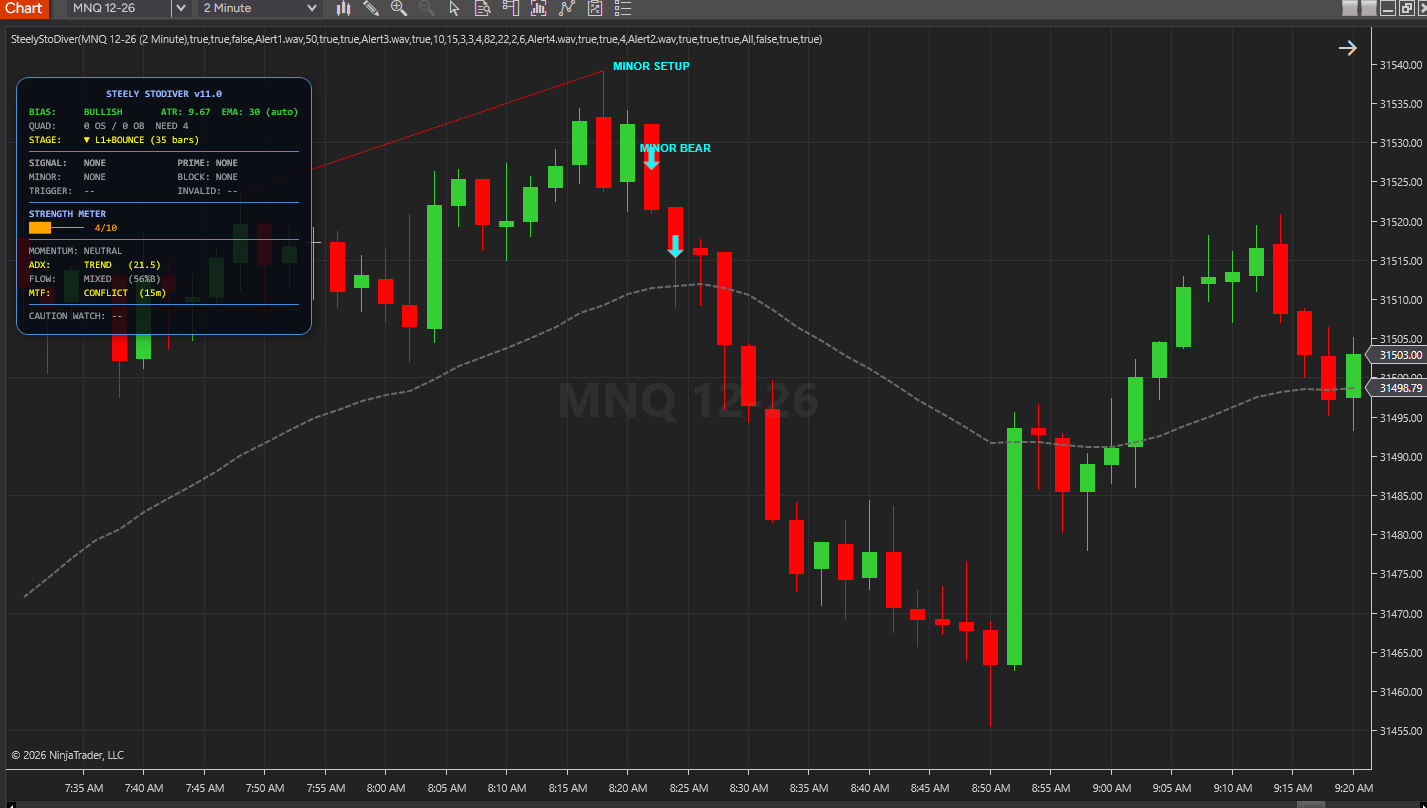
What SteelyStoDiver draws and reports in NinjaTrader 8.
PRIME, MINOR, and raw-divergence markers, each distinct, so each type reads at a glance.
Optional lines joining the two price pivots of each divergence, solid for PRIME and dashed for MINOR, showing which pivots the engine compared.
A 0–10 condition meter (display only), STAGE and TRIGGER rows that show setups still forming, and a CAUTION WATCH line counting bars since a PRIME CAUTION.
An optional EMA (auto-detected or manual period) with a trend filter that can block divergence signals fighting a strong trend.
Pivot confirmation with adjustable strength, an ATR filter (auto or manual ceiling), separate PRIME and MINOR trigger windows, reversal-candle and setup-bar-break requirements, a strong-countertrend block, and a Trend Gate — each gate optional, or stacked for maximum selectivity.
NinjaTrader 8 chart example. Other overlays may be visible alongside the featured indicator.
Click to enlargeMultiple stochastic readings and a confirmation sequence for divergence setups.
Keep in mind: Confirmation describes the indicator’s rule sequence, not certainty that price will reverse.
Raw divergence is one of the most over-used patterns in retail charting. Price makes a lower low, the oscillator makes a higher low — and price often keeps going in the same direction anyway.
The problem isn't the pattern. It's the missing confirmation. SteelyStoDiver treats divergence as a setup, not a signal.
A divergence is marked as confirmed only after the state machine sees the required follow-through — a pivot confirmation, an optional volatility check, then a reversal candle that breaks the setup bar, within a defined window. Miss the sequence, and it stays a SETUP, never a BULL or BEAR signal.
Important Notice: This indicator is a non-customized charting tool provided for educational and informational market analysis only. It highlights conditions that meet proprietary analytical criteria and does not constitute financial advice, trading recommendations, or a solicitation to buy or sell any instrument. All signal output is analytical in nature. Users remain solely responsible for whether, when, and how they trade. Past performance of any analytical method is not indicative of future results. Educational and informational only; not a recommendation to buy or sell.
Every divergence it labels falls into one of three tiers. PRIME and MINOR signals always show; Signal Display adds setups and raw divergence, and MINOR setups get their own, shorter trigger window.
| Stage | What It Means |
|---|---|
| PRIME | Full state-machine sequence — L1 with all four stretched, bounce, L2, confirmation. |
| MINOR | Classic divergence on the four-stochastic average, with its own trigger window. |
| Raw Divergence | A MINOR divergence that a filter blocked — informational only. |
A divergence advances through defined states — loaded → trigger window → confirmation — and only fires PRIME when every stage is satisfied.
For traders who like the divergence pattern but find raw divergence too noisy — the confirmation stack is the difference between a setup and a signal.
With Signal Display on SignalsOnly, the chart shows just confirmed PRIME and MINOR signals and cautions, leaving setups and raw patterns off.
The STAGE, SIGNAL, MINOR and TRIGGER rows track a setup as it forms (L1, bounce, SETUP, trigger level) before the BULL or BEAR label prints.
Each gate — pivot strength, ATR ceiling, reversal candle, setup-bar break, countertrend block — turns off for a looser read or stacks for maximum selectivity.
NinjaTrader 8, version 8.1.x, on Windows. A live or sim market data connection in NinjaTrader 8. No other SteelySystems indicator is required — every tool runs standalone.
Yes — $159 one-time as a Standard-tier indicator. It is also included in the Complete Suite ($1,800, all 12 paid indicators plus the free SteelyNewsPanel and SteelyStructure — $2,362 bought one at a time).
Checkout runs through Whop. Your license key and the download appear at whop.com/steelysystems (sign in with your checkout email), normally within minutes; the Install guide there walks through setup. Import the file in NinjaTrader 8 via Tools → Import NinjaScript Add-On, enter the key, and add the indicator to a chart. Email install support is included.
The license is per user. Install it on any desktop, laptop or VPS that you personally use for your own trading. Sharing the key or the files is not permitted — see the License Agreement.
A one-time Founders license with compatibility patches and install support, available through December 31, 2026. From January 1, 2027 new purchases move to a subscription model. Founders keep their one-time licenses and are not required to subscribe.
Yes, within 7 days of purchase if the license key has not been activated. Once a key is activated the sale is final — details on the Refund Policy page.
No. Every signal, level, score or panel is an analytical aid, not a trade instruction. The indicator organizes context; the decision, the risk and the outcome are yours. Read the full disclosure before use.
Yes. The Steely Custom Sounds pack is free with every indicator purchase.
Yes, heavily, and on purpose. We use leading AI models and our own custom AI tooling in modeling, analysis and development, including the research behind the DI Briefs and Helix. AI doesn't generate trade signals and doesn't place trades. The indicators run rules we designed and can show on your chart. Everything is tested in simulation and in our own trading before it ships.
Each tool runs standalone.
SteelyStoDiver reads divergence across multiple stochastic streams, treats each find as a setup, and only fires PRIME once the state machine has seen the full follow-through. Its role is to make that confirmation sequence visible.
One-time Founders license License key and download at whop.com/steelysystems within minutes 7-day refund if not activated License terms One-page guide (PDF)